

前回までに、Stable Diffusion WebUI Forgeで静止画を生成し、Wan2.2を用いてI2Vによる短い動画クリップを作成するところまでを確認しました。
 パレイド生成AIショート動画自動生成チャレンジ: ComfyUIとWan2.2テンプレート導入とAPI利用の準備前回は、生成AIを使ってショート動画を自動生成するための全体方針を整理しました。今回はその準備として、動画パーツを生成するための WAN2.2 と Co…
今回は、この一連の処理をPythonからAPI経由で呼び出せる形に整理し、自動化できる状態を目指します。
全体構成の確認と事前準備
環境の準備にはStability Matrixを使用しました。
ここから、Stable Diffusion WebUI ForgeとComfyUIを導入します。
 パレイド生成AIショート動画自動生成チャレンジ: Stability MatrixでComfyUIとSD WebUIを準備素材生成の準備が整ったので、今回は実験としてショート動画をどこまで自動生成できるかを試してみます。 今回試す動画生成: ショート動画のベース …
API呼び出しの実装前に、UI上で静止画や動画が正しく生成できるかを確認しておきましょう。
これは単なる動作確認だけでなく、後続のAPI利用をスムーズに進めるために重要な準備作業です。
- Stable Diffusion系のAPIでは、直前にUIで使用したモデルや設定がデフォルトとして引き継がれるため、API呼び出し時の操作が簡単になります
- ComfyUIでは、ワークフローを一度実行してノードの分岐を確定させてから、API向けにJSONをエクスポートする必要があります
Stable Diffusionでの画像生成と注意事項
Stable Diffusion系のAPIは、バイブコーディングでも問題なくコード生成が可能です。一方で、注意すべき点として、生成した画像に関するライセンスや権利面の確認があります。
 パレイド生成AIショート動画自動生成チャレンジ: Stable Diffusion WebUI Forge導入とAPI利用前回まで、生成AIによるショート動画の自動生成を目指し、I2Vを行うための WAN2.2 と ComfyUI の設定を進めました。 今回は、I2Vの元となる画像…
ComfyUIからは、CivitAIやHugging Faceなどを横断的にチェックし、モデルを簡単にインストールできるため後回しになりがちですが、配布元によっては権利関係が整理されていなかったり、利用にあたって特定のライセンス条件が課されている場合があり、確認が必要です。
個人利用や、商用であっても内部利用に留める場合は問題になりにくいケースが多いものの、生成物が既存IPに偶然抵触するリスクも残ります。配布元の説明だけに頼らず、第三者の指摘や事例も確認しつつ、AI任せにせず丁寧に判断することが重要です。
ComfyUI+Wan2.2利用の注意点
ComfyUIでは、既存のワークフローを利用しAPI向けのJSONをエクスポートする方法が簡単です。
パレイド生成AIショート動画自動生成チャレンジ: ComfyUIとWan2.2テンプレート導入とAPI利用の準備前回は、生成AIを使ってショート動画を自動生成するための全体方針を整理しました。今回はその準備として、動画パーツを生成するための WAN2.2 と Co…
利用上のポイントは、WebUIで動作させた実績があるワークフローをJSONでエクスポートすることです。
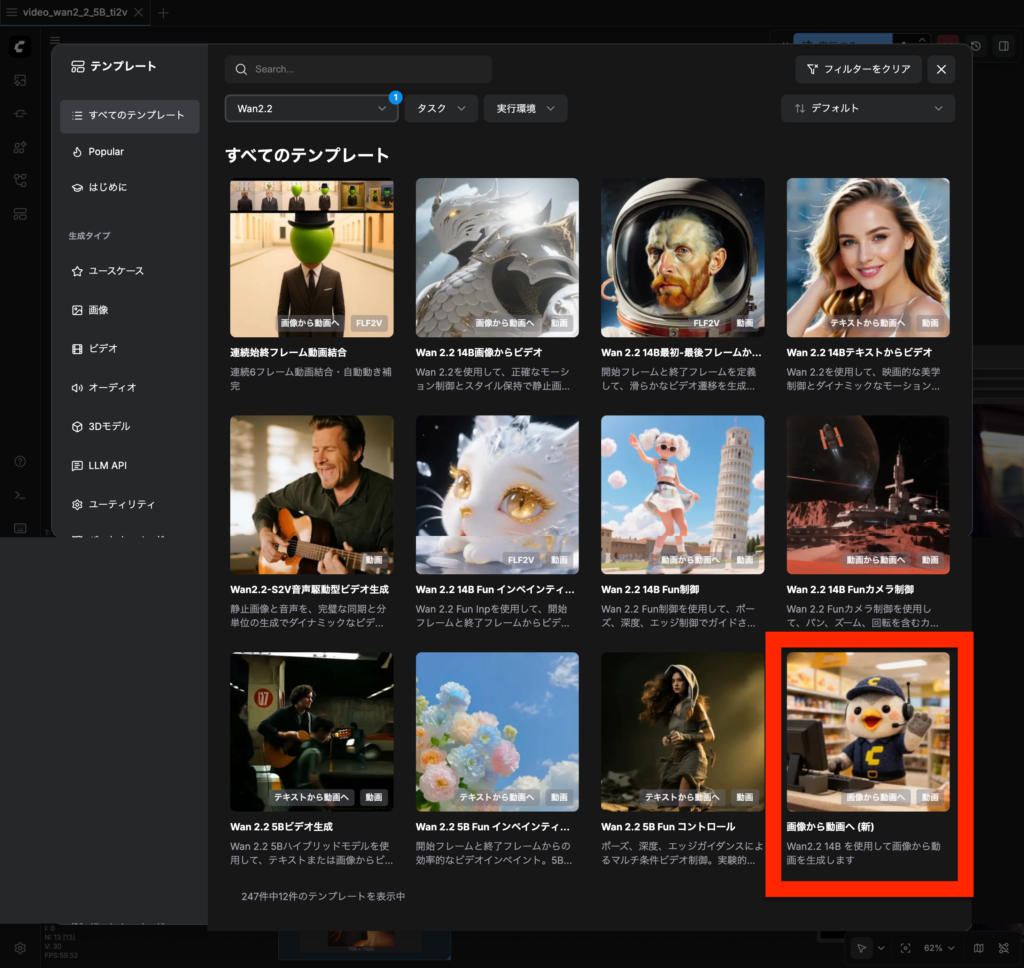
今回の用途であれば、テンプレートからWan2.1やWan2.2を利用したI2V・TI2Vのワークフローを使用できます。ただし、テンプレートを開いた直後にJSONをエクスポートしても、API呼び出しでは正しく動作しません。
これは、TI2VではLoadImageノードがデフォルトで無効になっている場合があることや、I2Vでは実行時になって初めてノードの分岐先が確定するためです。その結果、未実行の状態でエクスポートしたJSONには、必要なノードや接続情報が含まれないことがあります。
バイブコーディングではJSONの中身まで確認しないことも多く、動画自体は生成されるものの出力が不安定になるなど、原因の特定が難しい挙動として現れます。さらに、この問題は現象の言語化が難しく、AIに相談しづらいため、原因特定に時間を要しがちです。
おり、AIとの親和性が高い点が魅力です。一方で、公式以外でも実績のあるワークフロー、たとえば人気のEasyWan22などは動作報告も多く、用途によっては有力な選択肢になります。ただし、NSFWコンテンツを含まれる場合もあるため、利用シーンに応じて注意が必要です。
※コード例は長いので記事の最後に掲載しています。
まとめ
今回の実装で、Stable DiffusionとWan2.2を組み合わせ、PythonからAPI経由で数秒程度の動画クリップを自動生成できる状態まで到達しました。
UI操作に頼らず処理を呼び出せるようになったことで、試行錯誤や再生成を含むワークフローをコード側で管理できるようになります。
次回以降は、生成した複数の動画クリップを繋ぎ合わせ、音楽を合成することで、ショート動画として完成させていく予定です。
最終的には、素材生成から動画完成までを一連の自動処理として整理していきます。
参考)コード例
下記は、ChatGPTと何度かやり取りを行いながら生成したコード例です。IPアドレスやパスなどの環境依存部分は一部編集しています。
実行にあたっては、事前に必要なパッケージのインストールと、同じフォルダにComfyUIからエクスポートしたワークフローJSONが必要になりますが、ここでは詳細を省略しています。
コード全体を見ると、ChatGPTがAPI仕様を完全に把握しきれず、曖昧な処理が挟まっている箇所も見受けられます。いろいろ試しましたが、これを排除するよう指示してもAIには難しいようです。APIの使い方として最適とは言えない部分も残りそうですが、まずは動画が出力される状態を優先し、バイブコーディングを活かす方針としました。
下記は、ChatGPTと何度かやり取りをして生成したコード例です。IPやパスなどは編集してあります。
"""
Forge(txt2img) -> ComfyUI(WAN2.2 workflow JSON) で動画生成する統合スクリプト

- Forge: /sdapi/v1/txt2img を叩いて画像を生成しPNG保存
- ComfyUI: エクスポート済み workflow JSON を読み込み、変数で指定した値を流し込んで /prompt へ投入
- workflow 内に LoadImage が存在すれば、生成したPNGを ComfyUI に upload してそのファイル名を差し込む

要件:
  pip install requests
"""

from __future__ import annotations

import base64
import json
import time
import uuid
from dataclasses import dataclass
from pathlib import Path
from typing import Any, Dict, List, Optional, Tuple

import requests


# =========================
# 設定(ここを変数で触る)
# =========================

@dataclass
class Params:
    # Forge
    forge_base_url: str = "http://127.0.0.1:7860"
    forge_timeout_sec: int = 300

    # ComfyUI
    comfy_base_url: str = "http://127.0.0.1:8188"
    comfy_timeout_sec: int = 3 * 60 * 60  # 3時間まで許容(品質/安定重視で長め)
    comfy_poll_interval_sec: float = 2.0  # ポーリング間隔(サーバ負荷軽減)

    # 入力/出力
    workflow_json_path: str = "./video_wan2_2_5B_ti2v_executed.json"  # WebUIで実行後にExportしたI2V確定JSON
    out_dir: str = "./outputs"

    # 画像生成(Forge / 静止画)
    forge_positive_prompt: str = (
        "Japanese woman, bust shot, facing camera, upper body only, "
        "natural makeup, neat hair, casual modern outfit, "
        "soft indoor lighting, clean background, "
        "cinematic portrait, sharp focus, realistic skin texture, "
        "high quality"
    )
    forge_negative_prompt: str = (
        "full body, low angle, extreme close-up, cleavage emphasis, "
        "lowres, blurry, bad anatomy, distorted face, extra limbs, "
        "watermark, logo, text, jpeg artifacts"
    )

    # 動画生成(WAN2.2 / 動き用プロンプト)
    wan_positive_prompt: str = (
        "Japanese woman, big smile, cheerful, energetic, "
        "TikTok dance, dancing, upbeat choreography, "
        "upper body dance, rhythmic arm swings, shoulder bounce, "
        "head bobbing, lively movement, confident smile, "
        "smooth motion, natural human movement, high motion intensity"
    )
    wan_negative_prompt: str = (
        "still pose, standing still, frozen, minimal movement, "
        "low motion, static, slideshow, "
        "angry face, serious expression, violent motion, "
        "sexualized movement, unnatural motion, "
        "glitch, jitter, distorted body, extra limbs"
    )
    sd_model_checkpoint: Optional[str] = None  # 例: "sd_xl_base_1.0.safetensors"(必要なら)
    sampler_name: str = "Euler a"
    steps: int = 12
    cfg_scale: float = 5.5
    width: int = 480
    height: int = 832
    seed: int = -1  # -1 でランダム

    # 動画生成(ComfyUI / WAN2.2)
    video_seconds: int = 5  # 動画秒数(length計算に使用)
    fps: int = 16  # WAN2.2は16fps周辺が安定しやすい
    # ↓ Comfyワークフロー側で steps/cfg/seed/width/height/length を持つノードに流し込む
    wan_steps: int = 24  # 動き/時間方向の整合性を強める
    wan_cfg: float = 4.0  # 動き指示が通りやすい設定(上げすぎ注意)
    wan_seed: int = 123456  # 任意
    wan_width: int = 480   # 縦動画向け(Forgeと揃える)
    wan_height: int = 832
    wan_length_override: int | None = 81  # 定番フレーム数(16fps×約5秒相当)。Noneならfps×sec+1


# =========================
# ユーティリティ
# =========================

def _post_json(url: str, payload: Dict[str, Any], timeout_sec: int) -> Dict[str, Any]:
    r = requests.post(url, json=payload, timeout=timeout_sec)
    r.raise_for_status()
    return r.json()

def _get_json(url: str, timeout_sec: int) -> Dict[str, Any]:
    r = requests.get(url, timeout=timeout_sec)
    r.raise_for_status()
    return r.json()

def _ensure_dir(p: Path) -> None:
    p.mkdir(parents=True, exist_ok=True)


# =========================
# 1) Forge: txt2img
# =========================

def forge_txt2img(params: Params) -> Path:
    """
    Forge(sdapi)で画像生成してPNG保存し、そのパスを返す
    """
    out_dir = Path(params.out_dir)
    _ensure_dir(out_dir)

    url = f"{params.forge_base_url.rstrip('/')}/sdapi/v1/txt2img"

    payload: Dict[str, Any] = {
        "prompt": params.forge_positive_prompt,
        "negative_prompt": params.forge_negative_prompt,
        "sampler_name": params.sampler_name,
        "steps": int(params.steps),
        "cfg_scale": float(params.cfg_scale),
        "width": int(params.width),
        "height": int(params.height),
        "seed": int(params.seed),
    }

    # モデル切替を使う場合(Forge側が受け付ける構成のとき)
    # ※環境によっては "override_settings": {"sd_model_checkpoint": "..."} が必要
    if params.sd_model_checkpoint:
        payload["override_settings"] = {"sd_model_checkpoint": params.sd_model_checkpoint}

    data = _post_json(url, payload, timeout_sec=params.forge_timeout_sec)

    images_b64: List[str] = data.get("images", [])
    if not images_b64:
        raise RuntimeError("Forge txt2img returned no images")

    # 1枚目を保存
    b64 = images_b64[0]
    # data:image/png;base64, が付く場合があるので除去
    if "," in b64 and b64.strip().lower().startswith("data:"):
        b64 = b64.split(",", 1)[1]

    img_bytes = base64.b64decode(b64)
    ts = time.strftime("%Y%m%d_%H%M%S")
    out_path = out_dir / f"forge_{ts}.png"
    out_path.write_bytes(img_bytes)

    print(f"[Forge] saved image: {out_path}")
    return out_path


# =========================
# 2) ComfyUI: upload / prompt / wait / download
# =========================

def comfy_upload_image(comfy_base_url: str, image_path: Path, timeout_sec: int) -> str:
    """
    ComfyUIに画像をアップロードして、サーバ側のファイル名を返す
    """
    url = f"{comfy_base_url.rstrip('/')}/upload/image"
    with image_path.open("rb") as f:
        files = {"image": (image_path.name, f, "image/png")}
        r = requests.post(url, files=files, timeout=timeout_sec)
    r.raise_for_status()
    j = r.json()
    # 典型: {"name":"xxxx.png","subfolder":"","type":"input"} のような形式
    name = j.get("name")
    if not name:
        raise RuntimeError(f"Unexpected upload response: {j}")
    print(f"[ComfyUI] uploaded image as: {name}")
    return name

def load_workflow(path: Path) -> Dict[str, Any]:
    return json.loads(path.read_text(encoding="utf-8"))

def patch_workflow_for_wan(workflow: Dict[str, Any], params: Params, uploaded_image_name: Optional[str]) -> Dict[str, Any]:
    """
    - CLIPTextEncode の text を positive/negative に差し替え(あれば)
    - KSampler の seed/steps/cfg を差し替え(あれば)
    - Wan22ImageToVideoLatent の width/height/length を差し替え(あれば)
    - CreateVideo の fps を差し替え(あれば)
    - LoadImage があれば image を uploaded_image_name に差し替え(I2V用)
    """
    # 長さ(フレーム数)。WAN2.2は特定のfps/frames組み合わせで安定しやすいことがあるため、overrideを優先。
    if getattr(params, "wan_length_override", None) is not None:
        length = int(params.wan_length_override)
    else:
        length = int(params.fps * params.video_seconds + 1)

    # I2Vの配線(start_image)が存在するか最低限チェック
    has_start_image_wiring = False

    found = {
        "pos": 0,
        "neg": 0,
        "ksampler": 0,
        "latent": 0,
        "fps": 0,
        "loadimage": 0,
    }

    for node_id, node in workflow.items():
        class_type = node.get("class_type", "")
        inputs = node.get("inputs", {})

        if class_type == "CLIPTextEncode":
            # title で判別できる場合がある
            title = (node.get("_meta", {}) or {}).get("title", "")
            if "Positive" in title or "プロンプト" in title:
                if "text" in inputs:
                    inputs["text"] = params.wan_positive_prompt
                    found["pos"] += 1
            if "Negative" in title or "ネガ" in title:
                if "text" in inputs:
                    inputs["text"] = params.wan_negative_prompt
                    found["neg"] += 1

        elif class_type == "KSampler":
            # 添付ワークフローでは node "3" が KSampler で seed/steps/cfg を持つ構成  [oai_citation:1‡video_wan2_2_5B_ti2v.json](sediment://file_000000008ad872089666bdde36325094)
            if "seed" in inputs:
                inputs["seed"] = int(params.wan_seed)
            if "steps" in inputs:
                inputs["steps"] = int(params.wan_steps)
            if "cfg" in inputs:
                inputs["cfg"] = float(params.wan_cfg)
            found["ksampler"] += 1

        elif class_type == "Wan22ImageToVideoLatent":
            # 添付ワークフローでは node "55" が width/height/length を持つ  [oai_citation:2‡video_wan2_2_5B_ti2v.json](sediment://file_000000008ad872089666bdde36325094)
            if "width" in inputs:
                inputs["width"] = int(params.wan_width)
            if "height" in inputs:
                inputs["height"] = int(params.wan_height)
            if "length" in inputs:
                inputs["length"] = int(length)
            if "batch_size" in inputs:
                inputs["batch_size"] = 1

            # start_image が接続されている(I2V確定)かを確認
            if "start_image" in inputs and isinstance(inputs["start_image"], list):
                has_start_image_wiring = True

            found["latent"] += 1

        elif class_type == "CreateVideo":
            if "fps" in inputs:
                inputs["fps"] = int(params.fps)
                found["fps"] += 1

        elif class_type == "LoadImage":
            # I2Vワークフローならここがあるはず
            if uploaded_image_name and "image" in inputs:
                inputs["image"] = uploaded_image_name
                found["loadimage"] += 1

    if uploaded_image_name and not has_start_image_wiring:
        raise RuntimeError(
            "I2V wiring not found: Wan22ImageToVideoLatent.start_image is missing. "
            "Use an executed/exported I2V workflow JSON (with start_image connected)."
        )

    print(f"[ComfyUI] patched: {found}")
    if uploaded_image_name and found["loadimage"] == 0:
        print("[WARN] workflowにLoadImageが見つからず、生成画像を差し込めませんでした(このJSONはTI2V構成の可能性)。")

    return workflow

def comfy_queue_prompt(comfy_base_url: str, workflow: Dict[str, Any], timeout_sec: int) -> str:
    url = f"{comfy_base_url.rstrip('/')}/prompt"
    client_id = str(uuid.uuid4())
    payload = {
        "prompt": workflow,
        "client_id": client_id,
    }
    j = _post_json(url, payload, timeout_sec=timeout_sec)
    prompt_id = j.get("prompt_id")
    if not prompt_id:
        raise RuntimeError(f"Unexpected /prompt response: {j}")
    print(f"[ComfyUI] queued prompt_id={prompt_id}")
    return prompt_id

def comfy_wait_done(comfy_base_url: str, prompt_id: str, timeout_sec: int, poll_interval_sec: float) -> Dict[str, Any]:
    """
    /history/{prompt_id} をポーリングして、outputs が揃うまで待つ。
    10秒ごとに経過/残りを表示する。
    """
    start = time.time()
    deadline = start + timeout_sec
    url = f"{comfy_base_url.rstrip('/')}/history/{prompt_id}"

    last_print = 0.0
    while True:
        now = time.time()
        if now > deadline:
            raise TimeoutError(f"ComfyUI wait timeout for prompt_id={prompt_id}")

        # 10秒に1回だけログ表示
        if now - last_print >= 10.0:
            elapsed = int(now - start)
            remaining = int(deadline - now)
            print(f"[ComfyUI] waiting... elapsed={elapsed}s remaining={remaining}s prompt_id={prompt_id}")
            last_print = now

        try:
            hist = _get_json(url, timeout_sec=60)
            item = hist.get(prompt_id)
            # 完了条件: outputs が存在
            if isinstance(item, dict) and item.get("outputs"):
                return item
        except Exception:
            # historyがまだ取れない/一時的エラーは無視して待つ
            pass

        time.sleep(poll_interval_sec)

def comfy_collect_output_files(history_item: Dict[str, Any]) -> List[Dict[str, str]]:
    """
    history の outputs から、動画/画像ファイルの情報を抽出する
    返り値: [{"type":"video|image", "filename":..., "subfolder":..., "kind":"output|temp|input"}]
    """
    results: List[Dict[str, str]] = []
    outputs = history_item.get("outputs", {}) if isinstance(history_item, dict) else {}

    for _node_id, out in outputs.items():
        if not isinstance(out, dict):
            continue

        if "videos" in out and isinstance(out["videos"], list):
            for v in out["videos"]:
                if isinstance(v, dict) and "filename" in v:
                    results.append({
                        "type": "video",
                        "filename": v.get("filename", ""),
                        "subfolder": v.get("subfolder", ""),
                        "kind": v.get("type", "output"),
                    })

        if "images" in out and isinstance(out["images"], list):
            for im in out["images"]:
                if isinstance(im, dict) and "filename" in im:
                    results.append({
                        "type": "image",
                        "filename": im.get("filename", ""),
                        "subfolder": im.get("subfolder", ""),
                        "kind": im.get("type", "output"),
                    })

    return results

def comfy_download_file(comfy_base_url: str, fileinfo: Dict[str, str], out_dir: Path, timeout_sec: int) -> Path:
    """
    /view?filename=...&type=...&subfolder=... でDLして保存
    """
    _ensure_dir(out_dir)

    filename = fileinfo["filename"]
    subfolder = fileinfo.get("subfolder", "")
    kind = fileinfo.get("kind", "output")  # output / temp / input

    url = f"{comfy_base_url.rstrip('/')}/view"
    params = {"filename": filename, "type": kind, "subfolder": subfolder}

    r = requests.get(url, params=params, timeout=timeout_sec)
    r.raise_for_status()

    out_path = out_dir / filename
    out_path.write_bytes(r.content)
    return out_path


# =========================
# main
# =========================

def main() -> None:
    p = Params()

    out_dir = Path(p.out_dir)
    _ensure_dir(out_dir)

    # 1) Forgeでまず画像生成
    generated_image_path = forge_txt2img(p)

    # 2) ComfyUIに画像アップロード(I2Vワークフローなら使う)
    uploaded_name: Optional[str] = None
    try:
        uploaded_name = comfy_upload_image(p.comfy_base_url, generated_image_path, timeout_sec=p.comfy_timeout_sec)
    except Exception as e:
        print(f"[WARN] ComfyUI upload failed (画像差し込み無しで続行): {e}")

    # 3) ワークフロー読み込み & パッチ
    wf_path = Path(p.workflow_json_path)
    if not wf_path.exists():
        raise FileNotFoundError(f"workflow json not found: {wf_path.resolve()}")

    workflow = load_workflow(wf_path)
    workflow = patch_workflow_for_wan(workflow, p, uploaded_name)

    # 4) ComfyUIへ投入
    prompt_id = comfy_queue_prompt(p.comfy_base_url, workflow, timeout_sec=p.comfy_timeout_sec)

    # 5) 完了待ち
    history_item = comfy_wait_done(
        p.comfy_base_url,
        prompt_id,
        timeout_sec=p.comfy_timeout_sec,
        poll_interval_sec=p.comfy_poll_interval_sec,
    )
    print("[ComfyUI] done. collecting outputs...")

    # 6) 出力収集 & ダウンロード
    files = comfy_collect_output_files(history_item)
    if not files:
        print("[WARN] outputs not found in history. raw history item keys:", list(history_item.keys()) if isinstance(history_item, dict) else type(history_item))
        return

    saved_paths: List[Path] = []
    for fi in files:
        try:
            saved = comfy_download_file(p.comfy_base_url, fi, out_dir, timeout_sec=120)
            saved_paths.append(saved)
        except Exception as e:
            print(f"[WARN] download failed for {fi}: {e}")

    for sp in saved_paths:
        print(f"[OK] saved: {sp.resolve()}")

    print("All done.")


if __name__ == "__main__":
main() パレイド生成AIショート動画自動生成チャレンジ: 動画クリップと音楽を統合してffmpegで動画生成前回までに、ACE-Stepを用いた楽曲生成と、Stable Diffusion WebUI ForgeおよびWan2.2による動画クリップ生成の手順を確認しま…
 パレイドChatGPT・Geminiでのサムネイル自動生成の進化前回の記事では、AIを活用したサムネイル自動生成を試行しました。 ChatGPTやGeminiでは日本語の文字崩れや構造理解の難しさが課題となり、自然言語…